

Pokémon Browser Game: Build the Pokédex catalog
Outcome
Section titled “Outcome”Replace the Pokédex placeholder with a complete reference catalog. The page will contain eight distinct, unevolved Pokémon and will remain useful without JavaScript.
You will choose the Pokémon for your own project. This article uses eight specific Pokémon so the screenshots, checks, and next JavaScript article can refer to one stable example.
What you will practice
- Define one consistent content contract for repeated Pokédex entries.
- Use a semantic list and heading structure for a reference catalog.
- Choose and document eight distinct base-form Pokémon, including three future starter choices.
- Reuse a narrow-first Grid without changing the source order.
- Add local images with suitable text alternatives and flexible dimensions.
- Verify that the complete catalog works before JavaScript adds a filter.
Why build the Pokédex before the game
Section titled “Why build the Pokédex before the game”The game page will eventually combine forms, application state, movement, random encounters, and battles. The Pokédex has a smaller job: present a repeated collection of records clearly.
Completing the catalog first gives the next article stable HTML to select and filter. You can then study one JavaScript interaction without also building the game loop.
What is new and what is reused
Section titled “What is new and what is reused”- New: A repeated Pokédex entry contract, a catalog list, species selection, and a complete static reference page.
- Reused: The shared page shell, navigation, local image process, headings, custom properties, narrow-first CSS, Grid, validation, responsive checks, and Git workflow from the landing-page articles.
Starting point
Before you start
- The landing-page refinement passes its complete self-check.
- index.html, game.html, and pokedex.html still share working navigation and styles.css.
- pokedex.html identifies its future purpose but still contains placeholder main content.
- The project repository contains the verified landing-page checkpoints, and the working tree has no unexplained changes.
- Current state
- The website has a finished landing page and a working Pokédex route, but the Pokédex does not contain its reference entries yet.
- First action
- Open pokedex.html in VS Code and open the current Pokédex page in the browser. Identify the placeholder content inside main without changing the shared header, navigation, or footer.
- First checkpoint
- The page keeps its shared shell and shows one complete Pokédex entry with a number, name, type, planned role, local image, and original catalog note.
- Help trigger
- Use the nearest recovery note or ask for help if the shared navigation changes, a species fact cannot be verified, an image source is unclear, headings skip a level, repeated entries have different structures, or the catalog creates horizontal page scrolling.
Required result
Section titled “Required result”Complete this article when:
pokedex.htmlcontains eight distinct, unevolved Pokémon;- three entries identify the future starter choices and five identify possible wild encounters;
- each entry contains the same required information: National Pokédex number, name, type or types, planned role, local image, and one short original catalog note;
- the Pokémon entries form one semantic list in a meaningful source order;
- every list item uses the class
pokedex-entry, which the next article will use as a stable JavaScript selector; - headings describe the page and its entry structure without skipping a level;
- images load from the local
assets/folder, keep their aspect ratio, and have suitable alternative text; assets/README.mdrecords where each image came from and the source’s usage notice;- visible type and role labels communicate their meaning without depending on color;
- the base layout shows one complete column, and a content-based media query adds flexible columns when enough space is available;
- all eight entries remain available at narrow width, at
200%zoom, and without JavaScript; - the page passes HTML and CSS checks and produces no Console error; and
- Git records the verified catalog checkpoint separately from the landing-page checkpoints.
1. Choose eight Pokémon
Section titled “1. Choose eight Pokémon”Your Pokédex should reflect your version of the project. Choose eight distinct base-form Pokémon. Mark three as the starter choices for the later game and five as possible wild encounters.
Keep the technical contract stable while you make the content choice:
- use eight different National Pokédex numbers;
- include at least three types across the complete set;
- select only unevolved, base-form Pokémon;
- choose three future starter options; and
- do not include two forms of the same species as separate entries in this first catalog.
Guided reference set
Section titled “Guided reference set”Use this set when you want to follow the article and future screenshots exactly. You can replace any or all of the species in your own project.
| Planned role | Pokémon | National Pokédex number | Type |
|---|---|---|---|
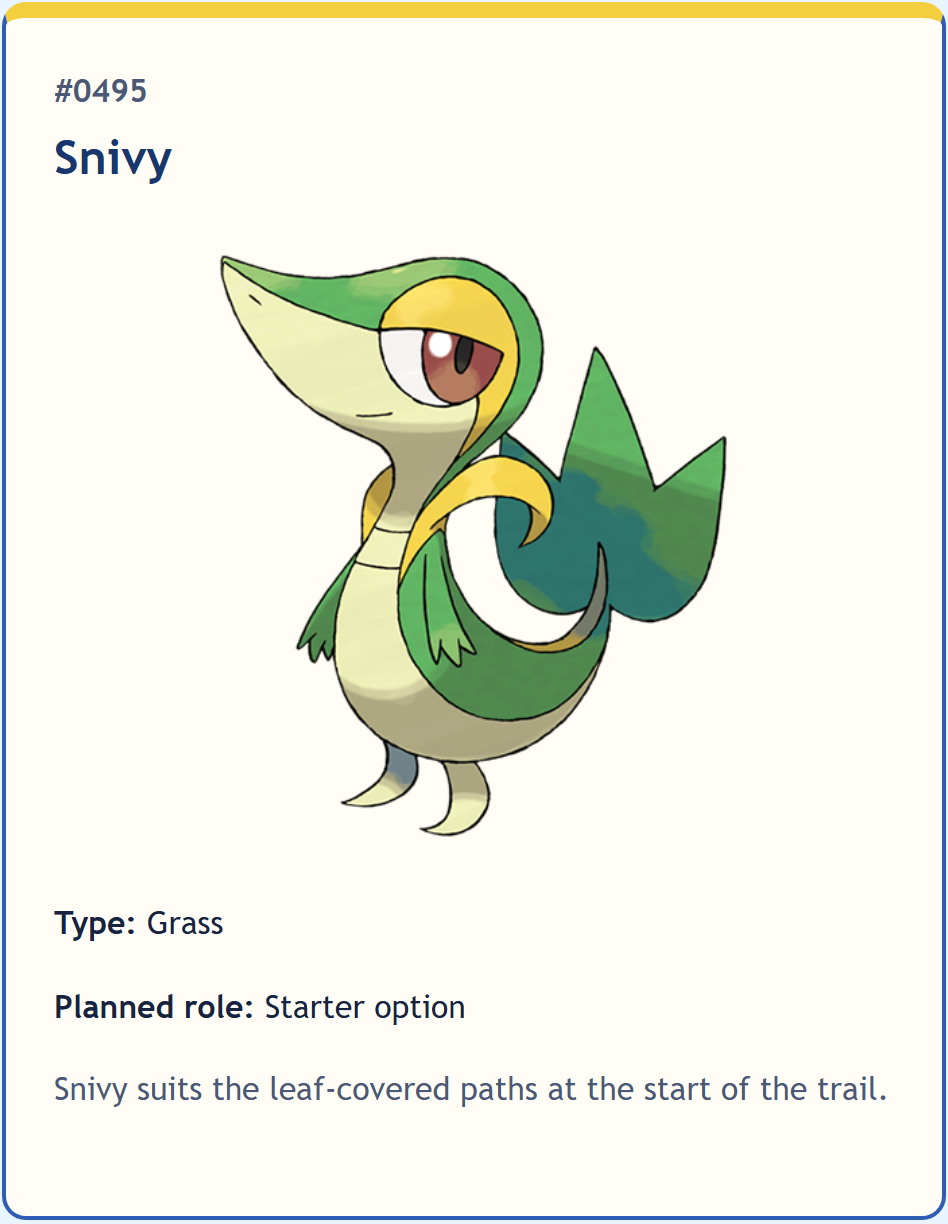
| Starter option | Snivy | #0495 |
Grass |
| Starter option | Fuecoco | #0909 |
Fire |
| Starter option | Totodile | #0158 |
Water |
| Wild encounter | Bounsweet | #0761 |
Grass |
| Wild encounter | Growlithe | #0058 |
Fire |
| Wild encounter | Poliwag | #0060 |
Water |
| Wild encounter | Mareep | #0179 |
Electric |
| Wild encounter | Misdreavus | #0200 |
Ghost |
The repeated Grass, Fire, and Water types will make the next article’s filter result easy to verify. Electric and Ghost provide two one-entry results.
Verify your choices
Section titled “Verify your choices”Use the official Pokémon Pokédex or another reliable Pokédex source to confirm each name, National Pokédex number, and type. Record the facts in a short working list before you write the HTML. Keep the leading zeroes in visible four-digit numbers so entries such as #0058 and #0909 follow one display format.
Write your own short catalog note for each entry. Do not copy a published Pokédex description. The note can describe why the species fits your planned game area, starter group, or encounter set.
Read the eight numbers from your working list. Confirm that every number is unique, exactly three entries are starter options, and no entry is an evolved form.
If it does not work
Section titled “If it does not work”If a chosen species has a regional form or several current types, decide which specific form your project uses. Use the ordinary species name for the original form, such as Growlithe, or include the regional adjective for a regional form, such as Hisuian Growlithe. Do not combine facts from different forms in one entry.
Checkpoint: The catalog set is defined
- What now works
- Eight unique base-form Pokémon are recorded with verified numbers, types, and planned roles; exactly three are starter options.
- Files changed
pokedex.html- What remains
- Turn the recorded facts into one consistent semantic entry pattern.
- Next action
- Open the existing main element in pokedex.html and write the page introduction followed by one heading for the catalog list.
- If it does not work
- Compare the working list with the choice contract. Replace only the conflicting species or fact before editing the page structure.
2. Define the entry contract
Section titled “2. Define the entry contract”Every entry must answer the same questions. Repeated structure makes the catalog easier to scan and gives JavaScript a predictable DOM in the next article.
| Entry part | Required content | Technical role |
|---|---|---|
| Number | Four-digit National Pokédex number | Stable species identity |
| Name | Species name | Entry heading |
| Type | One or more visible type names | Reference fact and later filter value |
| Planned role | Starter option or wild encounter | Connection to the future game |
| Image | One permitted local project image | Visual identification |
| Catalog note | One short original sentence | Project-specific context |
Keep the number and name as separate text. Do not use the image file name, card position, or visible color as the species identity.
3. Replace the placeholder with the catalog structure
Section titled “3. Replace the placeholder with the catalog structure”Keep the shared header, navigation, and footer. Replace only the placeholder content inside main.
Build the main content in this order:
- Keep or add one page-level
h1that names the Pokédex. - Add a short introduction that explains what the catalog contains.
- Add an
h2that names the complete entry collection. - Add one
ulfor the catalog. - Give the list a class that describes its layout role, such as
pokedex-list. - Add one
lifor the first Pokémon. - Give that list item the exact class
pokedex-entry. - Place the complete entry content inside that list item.
Use a list because the entries form one related collection. The list item is also the Grid item and the unit that the next article will show or hide.
Do not add JavaScript, filter controls, data-* attributes, evolution information, or game statistics in this article.
4. Build and verify one entry
Section titled “4. Build and verify one entry”Build only the first entry from your selected set. If you use the guided set, begin with Snivy.
For the first entry:
- Add the National Pokédex number as text.
- Add the Pokémon name as an
h3. - Add a visible Type label followed by the type value.
- Add a visible Planned role label followed by Starter option or Wild encounter.
- Add one short original catalog note.
- Add the permitted image from
assets/with its real file path and dimensions. - Write alternative text from the image’s purpose in this entry.
Use Preserve an image source and record its state, Write alternative text from context, and Keep the image flexible for the image process.
Use a teacher-supplied image, an image that you created, or an image from a source that permits your intended use. Save the project copy in assets/. Do not use a remote image URL in src.
Create assets/README.md and record the source of each image. For a downloaded image, include the source page or repository, the download date, and the license, copyright, or usage notice provided by the source. For a teacher-supplied or self-created image, record that origin instead. This source note does not appear on the website, but it keeps the asset history with the project.
Reload pokedex.html. Confirm that:
- the shared page shell still works;
- the catalog introduction appears before the entry list;
- the first entry belongs to the list;
- its heading follows the page’s heading order;
- all six entry parts are visible;
- the image loads without changing the page width; and
- the page remains understandable if the image does not load.
If it does not work
Section titled “If it does not work”- If the image does not load, compare the exact
srcpath, file name, letter case, and file extension with the copy insideassets/. - If the heading outline jumps from
h1toh3, add or correct theh2that names the complete catalog before changing the entry heading. - If the entry is not announced as part of a list, confirm that the
liis a direct child of the catalogul.
Assistance 2 — Map each fact to one HTML role
Use the list item as the complete entry boundary. Inside it, keep the image, number, h3 name, labeled type, labeled planned role, and catalog note in the same order you intend to repeat. Do not choose elements from their default appearance; choose them from the content relationship.
Assistance 3 — Build the first entry in three passes
First add the number, name, type, role, and note as text. Reload and check the heading structure. Next add the local image and check its alternative text and dimensions. Last add entry-specific classes only where the shared CSS needs a stable selector.
Checkpoint: One complete entry establishes the pattern
- What now works
- The Pokédex page keeps its shared shell and contains one complete list entry with all six content roles, a working local image, and a correct heading level.
- Files changed
pokedex.html, assets- What remains
- Repeat the same semantic pattern for the other seven selected Pokémon.
- Next action
- Copy only the complete first list item, paste one new sibling after it, and replace every species-specific value with the second Pokémon's verified values.
- If it does not work
- Remove the incomplete duplicate if the structure becomes unclear. Restore the one passing entry, then compare each added child in order.
5. Add the other seven entries
Section titled “5. Add the other seven entries”Repeat the verified list-item pattern. Replace every species-specific value in each copy:
- number;
- name;
- type or types;
- planned role;
- image path, dimensions, and alternative text; and
- original catalog note.
Do not leave one species’ number, image text, or role inside another species’ entry. Keep each entry’s visible facts together.
Choose one meaningful source order and preserve it in the HTML. Valid options include:
- starter options first, followed by possible wild encounters;
- ascending National Pokédex number; or
- alphabetical order by name.
Do not change the source order later only to create a visual arrangement. Grid can change the number of columns without changing the reading order.
Count the direct list items in DevTools. Confirm that there are exactly eight. Read each entry from top to bottom and compare it with your working list.
Then temporarily disable styles.css. Confirm that the page still presents one understandable list with all numbers, names, types, roles, notes, and image alternatives in the intended order.
If it does not work
Section titled “If it does not work”If one entry looks different before CSS is disabled, compare its element nesting with the first passing entry. Correct the first mismatched opening or closing tag before changing another entry.
6. Build the narrow-first catalog layout
Section titled “6. Build the narrow-first catalog layout”Open styles.css. Preserve the shared page-shell rules and landing-page styles.
Style the new catalog in this order:
- Remove the
ulmarker and default list padding only from the Pokédex list. - Make the list a Grid container.
- Keep the base Grid to one complete column.
- Add consistent spacing between entries.
- Style each entry as one readable surface with flexible content.
- Keep images within their entries and preserve their aspect ratio.
- Add the wider catalog rule to a content-based
min-widthmedia query only when two or more entries have enough room to share a row. - Use flexible tracks so long names and notes can wrap.
Reuse the process from Build responsive components. The catalog has the same layout question as the landing-page feature collection: one-dimensional source order must remain stable while the available width permits more columns.
You can put the catalog rule inside an existing media query when its breakpoint also gives the entries enough room. Add a separate catalog breakpoint only when the existing value does not fit the content.
Type and role labels must remain readable as text. A type color can support the label, but color cannot replace the word Grass, Fire, Water, Electric, or Ghost.
Test the catalog near 320px, immediately below and above its breakpoint, at a wide viewport, and at 200% zoom.
Confirm that:
- every entry remains fully available;
- text wraps without overlap or clipping;
- images stay inside their entries;
- no fixed card width creates horizontal page scrolling;
- source and visual order still agree; and
- the shared navigation and landing page keep their existing layouts.
If it does not work
Section titled “If it does not work”If one entry widens the page, inspect its image, minimum width, padding, and longest unbroken text. Correct the overflowing item instead of hiding page overflow.

Checkpoint: The static Pokédex is complete
- What now works
- Eight complete entries form a readable semantic list, the narrow-first Grid adapts without reordering content, and all species information remains available without JavaScript.
- Files changed
pokedex.html, styles.css, assets- What remains
- Validate the complete page and record a stable recovery point before JavaScript adds filter behavior.
- Next action
- Return to a narrow viewport and begin the final verification route with JavaScript disabled.
- If it does not work
- Disable the Pokédex-specific Grid rules. Restore a readable one-column list first, then add only the wider track change again.
7. Validate and record the catalog checkpoint
Section titled “7. Validate and record the catalog checkpoint”Run the complete verification route:
- Open
pokedex.htmlin a fresh browser tab and confirm that all eight entries appear. - Follow every shared navigation link and use browser Back.
- Inspect the page heading outline and the catalog list in DevTools.
- Temporarily disable images and confirm that the entry names and text alternatives preserve identification.
- Test near
320px, on both sides of the catalog breakpoint, and at200%zoom. - Disable JavaScript in the browser and reload. All eight entries must remain available.
- Validate
pokedex.htmland reviewstyles.cssin the VS Code Problems panel. - Inspect the Console and confirm that the page reports no error.
- Inspect the Git diff and confirm that it contains the catalog, its focused styles, and the intended local assets without unrelated landing-page changes.
Use the solo-development loop to record the verified static catalog checkpoint.
Self-check
Complete these checks against the required result.
- Confirm that the catalog contains exactly eight distinct list items and that every item uses the pokedex-entry class.
- Confirm that exactly three entries say Starter option and the remaining five say Wild encounter.
- Compare every visible name, four-digit number, and type with the verified working list.
- Confirm that every species is an unevolved base form and that no evolution content appears.
- Disable styles.css and confirm that the heading outline, list relationship, and source order remain understandable.
- Confirm that every image loads locally, keeps its aspect ratio, has suitable alternative text, and does not widen the page.
- Test near 320px, at a wide viewport, and at 200% zoom without clipped content or horizontal page scrolling.
- Disable JavaScript and confirm that the complete catalog remains available.
- Confirm that type and planned-role meanings remain clear without color.
- Confirm that HTML validation passes, VS Code reports no unresolved CSS author error, and the Console is clear.
- Confirm that Git records the verified catalog separately from the landing-page checkpoints.
Optional extension: compare two source orders
Section titled “Optional extension: compare two source orders”After the required result passes, compare two meaningful source orders, such as planned role and National Pokédex number. Test both without CSS and at a narrow viewport. Keep the order that best supports how a visitor will use your catalog.
Do not add sorting controls, evolution information, more species, or JavaScript during this comparison.
Next step or safe stopping point
Section titled “Next step or safe stopping point”This is a safe stopping point. The Pokédex is a complete static reference, and the current commit is the recovery point for the next change.
Continue to Filter the Pokédex with JavaScript when all eight entries pass the self-check. The next article keeps the entries in HTML and adds one progressively enhanced type filter.